- Call us 01444 237070

Wacom Intuos Medium Black non Bluetooth
Product Code: U157031I
Share this item:
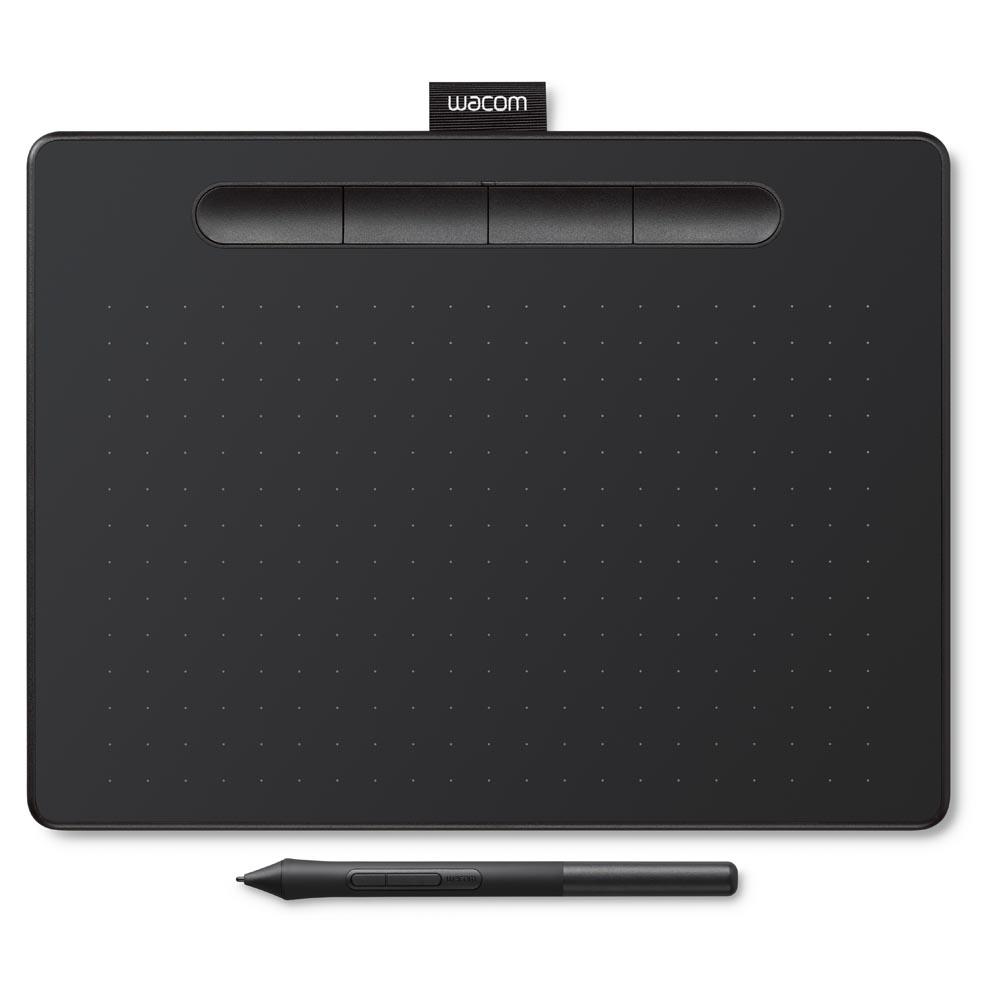
The Wacom Intuos Medium Black non Bluetooth version connects to Mac or PC for digital drawing, painting or photo editing, with intuitive pressure-sensitive pen-based input from the included Wacom Pen 4K.

Wacom Intuos Medium Black non Bluetooth Summary
The Wacom Intuos Medium Black non Bluetooth is a wired graphics tablet for pen-based input with macOS or Windows computers. It fits within the Intuos range below Wacom’s screen-based pen displays and above entry-level drawing accessories, offering a pressure-sensitive working surface without an integrated display or wireless connectivity.
This version features a USB connection, which removes battery management and wireless latency considerations. The medium active area provides more physical drawing space than the small Intuos models, allowing longer pen strokes and more natural hand movement when sketching, painting, or editing images.
A key distinction within the Intuos series is the use of Wacom’s EMR pen technology with 4,096 pressure levels and no internal battery, enabling the pen to operate continuously without charging. The tablet includes programmable ExpressKeys and pen buttons for shortcut access, keeping common commands within reach during use.
It is suitable for illustrators, photographers, and students who work mainly at a desk and want consistent pen response and predictable tracking from a compact wired setup.
Wacom Intuos Medium Black non Bluetooth Key Features
- Medium active area provides extended are for longer stroke lengths
- Battery-free EMR pen operates continuously without any charging
- 4,096 pressure levels for line weight and opacity changes
- ±0.25 mm pen accuracy supports precise cursor placement
- 7 mm pen reading height allows tracking before contact
- Four programmable ExpressKeys for shortcut access
- Two pen buttons enable tool switching without the keyboard
The tablet registers pen movement before contact, allowing controlled positioning when approaching a starting point. Pressure response ramps gradually rather than abruptly, which supports fine tonal adjustments during drawing and retouching.
Wacom Intuos Medium Black non Bluetooth in More Detail
Pen tracking
The Intuos Medium uses Wacom’s EMR technology, which powers the pen inductively from the tablet surface. Because the pen contains no battery, it is lightweight and balance is consistent over long sessions. Tracking begins up to 7 mm above the surface, allowing cursor positioning before the nib touches down.
Pressure sensitivity is measured across 4,096 levels, enabling gradual changes in line thickness or opacity when supported by the software. This pressure range is continuous rather than stepped, which is particularly useful for illustration and tonal photo work where subtle variation matters.
With a stated accuracy tolerance of ±0.25 mm, cursor placement remains predictable even at smaller brush sizes. This accuracy is noticeable when performing fine retouching or line work, where small hand movements need to translate directly on screen.
Tablet surface and working area
The medium active area measures 216 x 135 mm within a compact tablet body. This provides more room for arm and wrist movement than the small Intuos, reducing the need to scale or zoom excessively during drawing sessions. For users working on larger displays, the medium size helps maintain proportional hand movement without requiring a physically large tablet.
The tablet surface is 8.8 mm thick, keeping the drawing height close to desk level. This low profile reduces wrist lift during use and allows the tablet to sit comfortably alongside a keyboard.
Controls for workflow integration
Four ExpressKeys are positioned along the tablet edge and can be assigned to common actions such as undo, brush size adjustment, or modifier keys. The pen itself includes two programmable buttons, allowing tool switching or right-click access without reaching for the keyboard.
These controls reduce interruption during workflows that rely on frequent command changes, particularly in illustration and editing software. Configuration is handled through Wacom’s desktop software, where button assignments can be set per application.
Connectivity and setup
This model connects via USB and does not include Bluetooth functionality. The wired connection provides immediate recognition by compatible systems without pairing steps and removes the need for battery charging or wireless signal management.
The included USB cable uses an L-shaped connector at the tablet end, helping to keep the cable flush to the device when placed on a desk. Once connected, the tablet operates as a direct input device with no internal storage or standalone operation.
Frequently asked questions
Does this Intuos model support wireless use?
No, this version operates via USB connection only and does not include Bluetooth.
Is the pen rechargeable?
No, the pen uses EMR technology and does not require batteries or charging.
Can the ExpressKeys be customised per application?
Yes, shortcut assignments can be configured individually for different software.
How large is the active drawing area?
The active area measures 216 x 135 mm.
Does the tablet work with both Mac and Windows?
Yes, it is compatible with supported versions of macOS and Windows.
Does the tablet store files or drawings internally?
No, all input is sent directly to the connected computer.
What’s in the box
- Wacom Intuos Medium pen tablet
- Wacom Pen 4K pressure-sensitive pen
- PVC-free USB cable with cable tidy and L-shaped connector
- Three standard replacement nibs
- Nib removal tool built into the pen
- Quick start guide
- Regulation sheet
- Online user guide and product information via Wacom Desktop Centre
Wacom Intuos Medium Black non Bluetooth Specifications
|
Product type |
Pen tablet |
|
Connection |
USB |
|
Active area |
216 x 135 mm |
|
Tablet dimensions |
264 x 200 x 8.8 mm |
|
Weight |
410 g |
|
Pen technology |
EMR (Electro-Magnetic Resonance) |
|
Pressure levels |
4,096 |
|
Pen accuracy |
±0.25 mm |
|
Pen reading height |
7 mm |
|
ExpressKeys |
Four programmable keys |
|
Pen buttons |
Two programmable buttons |
|
Colour |
Black |
Would you like to give any feedback about this page?
Complete our feedback formWriting your review
Sign In / Register
Existing Customer Login
If you are already a member, fill in the details below to login & view your account.
Added to basket
xExclusive discounts when bought with this product
Condition guide
Our used products are subject to wear and tear in comparison to brand new products. This also applies to accessories that are supplied with the camera including batteries which may have a lower optimum performance level/life expectancy.
- Like New – The equipment is in a condition as if you have just bought it from the manufacturer. The item is still considered to be ‘Like New’ even without the original packaging and accessories. The product has been fully tested and is in perfect working order. Lenses are optically clear. There may be light dust present that will not effect the imagery.
- Excellent – The equipment should be close to being ‘Like New’ but there may be some small cosmetic blemishes that lower its grade. The product has been fully tested and is in perfect excellent order.
- Cameras – Should have no marks on the LCD screen
- Lenses – Should have no marks on the elements and optically clear. There may be light dust present that will not effect the imagery.
- Very Good – The equipment may have some slight cosmetic wear to the paintwork and cosmetic blemishes with only light signs of use and the product has been fully tested and is in great working order.
- Cameras – The LCD screen may have small signs of wear that does not affect its display
- Lenses – The mount of the lens will start to show signs of wear
- Good – The equipment is showing more obvious signs of cosmetic wear and blemishes, but the product has been fully tested and is in great working order.
- Cameras – LCD screen may have scratches or wear that is starting to affect the display.
- Lenses – May have slight dust inside that does not affect images. The mount shows signs of use.
- Well Used – The equipment will show significant signs of wear. The paintwork will be coming away in large areas exposing the metal work, but the product has been fully tested and is in great working order.
- Cameras – LCD screen is heavily worn either by de-lamination or has scratches to it. Rubber grips are starting to come away from the body.
- Lenses – The lens has dust inside that may affect images. The rubber zoom/focus ring is coming away from the barrel of the lens.
*All of our used items are listed with the accessories that are included. If they are not listed, then they will not be supplied at the point of purchase.
Why Buy Second Hand from Park Cameras

Park Approved Stock
Our used stock goes through a rigorous quality process. Each item is carefully inspected by our experienced specialists during the trade-in process and checked again before being listed for sale. This ensures you can shop with total peace of mind, knowing your gear has been thoroughly tested and approved.

Upto 12 Month Warranty
Shop our used gear with total confidence. Every item comes with upto a 12-month warranty (unless stated otherwise). Get the best brands for great value, and peace of mind all in one place. Don’t miss out — upgrade your kit today!

14 Day Returns Policy
When you purchase a Used item, you have a 14-day returns policy if the item isn’t as described. Enjoy peace of mind while getting great value on pre-owned gear!