- Call us 01444 237070

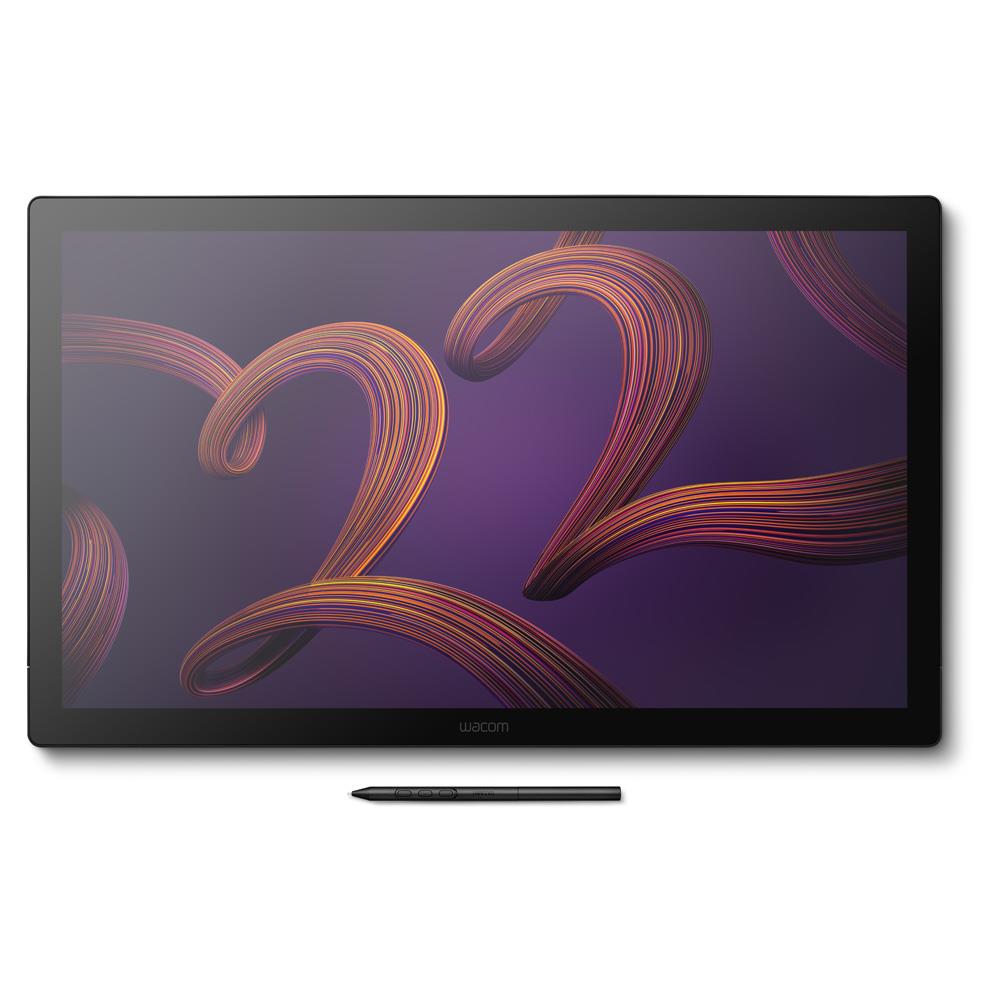
Wacom Cintiq Pro 22 Graphic Pen Display Without Stand
Product Code: U157073Q
Share this item:
The Wacom Cintiq Pro 22 is a 22-inch 4K pen display with a 120Hz refresh rate, wide-gamut colour coverage and Pro Pen 3 support for professional illustration, design and image editing.

Wacom Cintiq Pro 22 Graphic Pen Display (Without Stand) Summary
The Wacom Cintiq Pro 22 is a professional 22-inch 4K pen display for digital illustration, design, photography, video and 3D production workflows. It sits within Wacom’s Cintiq Pro range as a high-performance drawing display combining a wide-gamut panel, low latency pen interaction and a configurable pen system.
The display operates at 3840 x 2160 resolution with a 120Hz refresh rate and up to 12ms response time, supporting near-instant visual feedback when drawing, editing or animating. Colour reproduction covers 95% Adobe RGB and 99% DCI-P3 and includes Pantone validation along with HDR Gamma support for HDR video work.
Input is handled through Wacom’s Pro Pen 3, which supports 8,192 pressure levels, tilt detection and configurable grip and balance options. Eight rear ExpressKeys provide shortcut access while multi-touch gestures support zooming, panning and rotation within creative software.
What’s New in the Cintiq Pro 22
This generation adds a 120Hz refresh rate with a 12ms response time, reducing visible pen latency when drawing or editing high-frame-rate content. The panel also expands colour coverage with 95% Adobe RGB and 99% DCI-P3 support, alongside Pantone and Pantone SkinTone validation for accurate colour reproduction.
A redesigned chassis reduces bezel width and footprint compared with earlier models. Rear ExpressKeys have been repositioned for easier access while the updated Pro Pen 3 introduces modular grip, weight and button adjustments so users can configure pen balance and feel.
The display also adds four integrated 1/4-inch mounting threads to support accessories such as camera arms, lights or microphones in studio workspaces.
Wacom Cintiq Pro 22 Graphic Pen Display Key Features
- 22-inch 4K LCD panel displays artwork, photography and video with 3840 x 2160 resolution
- 120Hz refresh rate and up to 12ms response time reduce visible pen lag when drawing or editing
- Wide colour coverage includes 95% Adobe RGB and 99% DCI-P3 for colour-critical workflows
- Pantone Validated and Pantone SkinTone Validated certification
- Wacom Pro Pen 3 supports 8,192 pressure levels and tilt recognition for precise control
- Eight rear ExpressKeys provide configurable shortcuts for frequently used tools
- Multi-touch gesture support allows zoom, rotate and navigation directly on the surface
- Four integrated 1/4-inch mounting points support cameras, lights and workspace accessories
Wacom Cintiq Pro 22 Graphic Pen Display Without Stand In More Detail
4K display with colour accuracy
The 22-inch panel displays artwork and media at 3840 x 2160 resolution with a colour range that covers 95% Adobe RGB and 99% DCI-P3. Pantone validation confirms the display reproduces recognised colour standards used across print, photography and design workflows. Support for 10-bit colour (8-bit plus FRC) and HDR Gamma enables viewing and editing HDR video content using HLG and PQ gamma curves. Factory calibration provides consistent colour output, while Wacom Colour Manager software allows further calibration adjustments when required.
120Hz refresh rate plus reduced latency
A refresh rate of 120Hz combined with a response time of up to 12ms improves visual responsiveness compared with typical pen displays. Cursor movement remains smooth while drawing lines, editing images or animating sequences. Reduced latency between pen movement and screen response helps maintain accuracy when working on detailed artwork or frame-by-frame animation.
Pro Pen 3 compatibilty
Input is handled through Wacom Pro Pen 3, which detects 8,192 pressure levels and tilt angles up to ±60 degrees. The pen structure allows configuration of weight balance, grip thickness and button layout. Multiple grip and button plate options allow users to modify the pen to match drawing style or comfort preferences. Low activation force enables light strokes to register immediately on the display surface.
Workspace controls and ExpressKeys
Eight ExpressKeys are positioned on the rear grip area of the display and can be mapped to application shortcuts such as undo, brush size adjustment or layer switching. Multi-touch gestures allow zooming, rotating and panning directly on the display surface while continuing to draw with the pen. These controls reduce reliance on keyboard shortcuts during creative work.
Studio integration
The chassis includes four standard 1/4-inch mounting threads, enabling attachment of accessories such as camera arms, microphones, lighting or reference devices. The display also supports additional accessories including extension tables and pen trays. Reduced bezel size and a compact footprint allow the display to fit more easily within studio desks and multi-monitor editing setups.
VESA mounting
The display supports VESA 100 mounting (100 x 100 mm), allowing it to be installed on compatible monitor arms, desk mounts and studio support systems. This provides flexibility when integrating the pen display into editing desks, illustration workstations or multi-monitor setups. The unit weighs approximately 5.0 kg, so mounts should support at least 5.5 kg to ensure stable positioning during use.
Monitor arms that support swivel adjustment and rotation allow the display to move between drawing angles, upright editing positions and portrait orientation when required. Adjustable spring tension is recommended so the mount can counterbalance the weight of the display and maintain a stable working position while drawing.
Connection options include USB-C, HDMI and Mini DisplayPort inputs, allowing the display to connect with a wide range of modern computers and workstations. USB ports support pen input, touch control and driver communication between the display and host computer. This configuration allows the display to operate as a pen input device and colour-accurate monitor within the same workstation environment.
Frequently Asked Questions
Does the display include a stand?
No. This version of the display does not include a stand. A compatible VESA stand or the dedicated Wacom Cintiq Pro 22 stand can be purchased separately.
Which software works with this display?
It operates with most creative applications including Adobe Photoshop, Illustrator, Lightroom, After Effects, Blender, Maya, ZBrush and other pen-enabled software.
Is the included pen battery powered?
No. The Pro Pen 3 operates without batteries and draws power directly from the display.
Can the display be mounted on a monitor arm?
Yes. It supports VESA mounting and also includes four 1/4-inch mounting threads for accessories.
Who typically uses this type of display?
It is used by illustrators, photographers, designers, video editors, animators and 3D artists who work directly on a pen display for precision input.
Does it support touch gestures?
Yes. Multi-touch gestures allow zooming, panning and rotating within compatible software.
Wacom Cintiq Pro 22 Graphic Pen Display Specifications
|
Display size |
21.5 inch |
|
Display resolution |
3840 x 2160 (4K UHD) |
|
Screen resolution |
4K |
|
Display refresh rate |
120 Hz |
|
Response time |
12 ms |
|
Aspect ratio |
16:9 |
|
Active area (inch) |
18.7 x 10.5 inch |
|
Active area (mm) |
476 x 268 mm |
|
Surface |
Anti-glare glass |
|
Pixel pitch |
0.12398 x 0.12398 mm |
|
Colour depth |
30-bit (10-bit x RGB) |
|
Colour gamut |
95% Adobe RGB |
|
Colour gamut |
99% DCI-P3 |
|
Pantone validation |
Pantone Validated and Pantone SkinTone Validated |
|
HDR support |
HDR Gamma (HLG and PQ) |
|
|
|
|
Pen model |
Wacom Pro Pen 3 |
|
Pen technology |
Electromagnetic resonance |
|
Pressure levels |
8192 |
|
Tilt support |
±60° |
|
Pen weight |
9.1 g |
|
Report rate |
240 reports per second |
|
Reading height |
10 mm |
|
|
|
|
Touch input |
Multi-touch |
|
Touch technology |
Projected capacitive |
|
Touch capacity |
10 fingers |
|
|
|
|
Video inputs |
Mini DisplayPort |
|
Video inputs |
HDMI |
|
USB ports |
2 x USB-C |
|
USB ports |
1 x USB-A |
|
Security |
Kensington lock slot |
|
|
|
|
Product dimensions |
517 x 312 x 30 mm |
|
Product weight |
5.0 kg |
|
|
|
|
Stand included |
No |
|
VESA compatibility |
Yes |
|
|
|
|
Operating system support |
Windows 10 or later |
|
Operating system support |
macOS 11 or later |
|
Connection requirements |
USB-C with DisplayPort Alt Mode, or HDMI/DisplayPort plus USB |
|
Maximum supported output |
3840 x 2160 at 120 Hz |
What’s in the Box
- Wacom Cintiq Pro 22 display
- Wacom Pro Pen 3 with balance piece
- Two extra pen grips
- Three additional pen button plates
- Detachable pen tray
- Ten replacement nibs (five standard and five felt)
- Nib removal tool
- USB-C to USB-C cable (1.8 m)
- USB-C to USB-A cable (1.8 m)
- HDMI cable (1.8 m)
- Mini DisplayPort to DisplayPort cable (1.8 m)
- AC adaptor
- Power cord
- Quick start guide
- Regulation sheet
Thinking of choosing finance?
Finance is a great way to spread the cost of your purchase. To make it easy we have teamed up with Omni, one of the UK’s leading finance specialists, so that you can apply for and complete a loan application quickly, easily and informatively.
Omni Capital Retail Finance Ltd which is a credit provider/ lender regulated by the Financial Conduct Authority whose finance options are best suited for you and your purchase.
Simply add the items you love to your basket. Once you are at the checkout select the finance option that suits you and choose Omni. The quick application form is simple and should take no more than a couple of minutes to complete and you will receive a decision instantly. Easy!
Use our finance calculator to check the impact of various loan values, terms and interest rates on the total amount you need to pay and the monthly repayments.
Representative example:
Buy a £1,200.00 camera and pay a 10% deposit of £120. You'll borrow £1,080 over 24 months with an annual interest rate of 14.9% (fixed) with a first payment of £52.04 followed by 23 monthly repayments of £51.83. The total amount payable will be £1,244.13 14.9% APR Representative.
Finance available See options |
|
|
Check your eligibility
To be considered for finance, you will need to meet all of the following criteria:
- Are at least 18 years old
- Are in regular full or part-time employment (minimum 1 hour per week or £10,000 income per annum), unless you are retired and receiving a private or company pension, or you are in receipt of disability living allowance
- Are a permanent UK resident and have lived in the UK for at least 3 years
- Have a UK bank account capable of accepting Direct Debits
- Have a good credit history with no late payments, Debt Relief Orders, County Court Judgments or bankruptcies.

Please note that, due to calculations, your monthly repayment may differ very slightly from what you were expecting. Please check your monthly repayment figure before proceeding
Missed or late payments will result in fees and additional interest on your loan and can also affect your credit file and your ability to obtain credit in the future.
Credit is subject to status, UK only, 18+
Park Cameras Limited is a credit broker, not a lender and is authorised and regulated by the Financial Conduct Authority (FRN 680161). We do not charge you for credit broking services. We will introduce you exclusively to finance products provided by Omni Capital Retail Finance Ltd.
Omni Capital Retail Finance Ltd which is a credit provider/ lender regulated by the Financial Conduct Authority, Firm Reference Number: 720279. For more information please go to www.omnicapitalretailfinance.co.uk/contact/customer or visit www.omnicapitalretailfinance.co.uk.
Find out more about paying with finance here and Omni Capital Retail Finance Ltd terms here
Would you like to give any feedback about this page?
Complete our feedback formWriting your review
Sign In / Register
Existing Customer Login
If you are already a member, fill in the details below to login & view your account.
Added to basket
xExclusive discounts when bought with this product
Condition guide
Our used products are subject to wear and tear in comparison to brand new products. This also applies to accessories that are supplied with the camera including batteries which may have a lower optimum performance level/life expectancy.
- Like New – The equipment is in a condition as if you have just bought it from the manufacturer. The item is still considered to be ‘Like New’ even without the original packaging and accessories. The product has been fully tested and is in perfect working order. Lenses are optically clear. There may be light dust present that will not effect the imagery.
- Excellent – The equipment should be close to being ‘Like New’ but there may be some small cosmetic blemishes that lower its grade. The product has been fully tested and is in perfect excellent order.
- Cameras – Should have no marks on the LCD screen
- Lenses – Should have no marks on the elements and optically clear. There may be light dust present that will not effect the imagery.
- Very Good – The equipment may have some slight cosmetic wear to the paintwork and cosmetic blemishes with only light signs of use and the product has been fully tested and is in great working order.
- Cameras – The LCD screen may have small signs of wear that does not affect its display
- Lenses – The mount of the lens will start to show signs of wear
- Good – The equipment is showing more obvious signs of cosmetic wear and blemishes, but the product has been fully tested and is in great working order.
- Cameras – LCD screen may have scratches or wear that is starting to affect the display.
- Lenses – May have slight dust inside that does not affect images. The mount shows signs of use.
- Well Used – The equipment will show significant signs of wear. The paintwork will be coming away in large areas exposing the metal work, but the product has been fully tested and is in great working order.
- Cameras – LCD screen is heavily worn either by de-lamination or has scratches to it. Rubber grips are starting to come away from the body.
- Lenses – The lens has dust inside that may affect images. The rubber zoom/focus ring is coming away from the barrel of the lens.
*All of our used items are listed with the accessories that are included. If they are not listed, then they will not be supplied at the point of purchase.
Why Buy Second Hand from Park Cameras

Park Approved Stock
Our used stock goes through a rigorous quality process. Each item is carefully inspected by our experienced specialists during the trade-in process and checked again before being listed for sale. This ensures you can shop with total peace of mind, knowing your gear has been thoroughly tested and approved.

12 Month Warranty
Shop our used gear with total confidence. Every item comes with a 12-month warranty (unless stated otherwise). Get the best brands for great value, and peace of mind all in one place. Don’t miss out — upgrade your kit today!

14 Day Returns Policy
When you purchase a Used item, you have a 14-day returns policy if the item isn’t as described. Enjoy peace of mind while getting great value on pre-owned gear!