- Call us 01444 237070

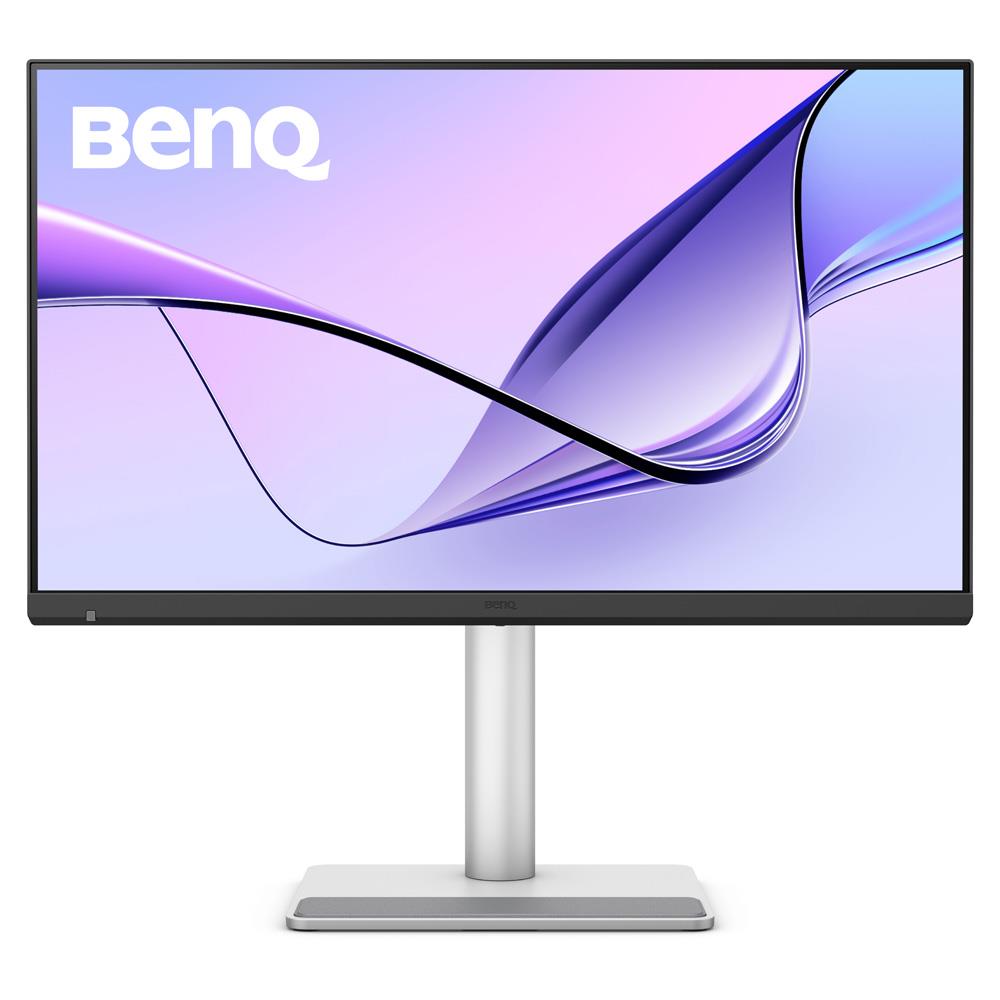
BenQ MA270S 27-inch 5K Nano Gloss Monitor with Stand for MacBook
Product Code: V158193P
Share this item:
The BenQ MA270S is a 27-inch 5K external monitor with a Nano Gloss IPS panel and Thunderbolt 4 connectivity for Mac-based creative workflows, which offers 99% Display P3 colour space and 96 W laptop charging.

BenQ MA270S 27-inch 5K Nano Gloss Monitor with Stand for MacBook Summary
The BenQ MA270S is a 27-inch 5K monitor developed for MacBook and Apple ecosystem users who require accurate colour reproduction, high pixel density and integrated Thunderbolt connectivity. It sits within BenQ’s MA series of Mac-optimised displays and focuses on colour consistency with MacBook screens alongside expanded connectivity and ergonomic flexibility for desk-based workflows.
A 5K resolution panel provides a pixel density comparable to Retina displays, while BenQ’s Mac colour-tuning technology maintains visual consistency between the monitor and connected Mac devices. The display covers 99 percent of the Display P3 colour space and uses a Nano Gloss surface that preserves the clarity and tonal depth associated with Apple displays while reducing glare.
Thunderbolt 4 connectivity enables high-speed data transfer, display output and charging through a single cable connection, while additional USB-C and HDMI ports support wider device integration. The MA270S suits photographers, video editors, designers and Mac users who require a high-resolution external display that integrates smoothly with the Apple workflow environment.
BenQ MA270S 27-inch 5K Monitor with Stand Key Features
- 27-inch 5K display delivers 218 pixels per inch for Retina-class detail
- 99% Display P3 colour space maintains colour consistency
- Nano Gloss panel surface preserves contrast and colour depth while reducing reflections
- Thunderbolt 4 connectivity supports 40 Gbps data transfer
- Up to 96 W laptop charging through a single cable
- Dual HDMI inputs allow connection of additional devices
- A built-in KVM switch allows keyboard and mouse to control two connected systems
- Display Pilot 2 software provides macOS-style control of monitor settings
- Adjustable stand provides height adjustment, tilt, swivel and pivot
BenQ MA270S 27-inch 5K Nano Gloss Monitor with Stand for MacBook In More Detail
5K resolution for Mac workflows
The BenQ MA270S uses a 27-inch panel with a 5K resolution and a dense pixel structure that renders text, icons and fine image detail clearly across macOS applications. At this resolution, small interface elements remain sharp and readable, and high-resolution photographs can be viewed at large sizes while retaining detail.
The high pixel density also improves timeline visibility in video editing software and increases workspace area when working with layered graphics or large documents. Users can display editing tools, preview windows and content panels simultaneously across the screen.
Display P3 colour reproduction
The MA270S reproduces ninety-nine percent of the Display P3 colour space, which is widely used across Apple displays and creative software. Images, graphics and video edited on a MacBook display appear consistent when viewed on the monitor, reducing colour shifts between screens.
This level of colour coverage supports photography editing, colour grading and design workflows where accurate colour representation is important for decision making during editing.
Nano Gloss panel surface
The Nano Gloss panel uses a refined coating that moderates reflections while maintaining the clarity of a glossy display surface. The screen retains strong contrast and visible colour depth while reducing the intensity of reflections that occur with conventional glossy panels.
Colour remains stable when the display is viewed from wider angles, which helps when adjusting screen position or when multiple people review work on the monitor.
Thunderbolt connectivity and integrated hub
The monitor includes dual Thunderbolt 4 ports that carry display signal, data transfer and laptop charging through a single cable connection. A MacBook connected via Thunderbolt can receive power while transmitting video to the monitor and accessing connected peripherals.
Additional USB-C and HDMI ports allow tablets, phones, computers and other devices to connect directly to the monitor. This arrangement allows the display to function as a central connection point in a desktop workspace.
Smart KVM system switching
A built-in KVM switch allows two computers to share a single keyboard and mouse connected to the monitor. Users can operate a MacBook and another computer, such as a Mac Studio or desktop workstation, without reconnecting input devices.
Switching between systems occurs through the monitor controls or software utilities, allowing users to move between machines while keeping the same workspace setup.
Display Pilot 2 software integration
BenQ Display Pilot 2 software integrates monitor settings with macOS keyboard controls. Brightness and volume adjustments made on the Mac keyboard can apply to both the laptop display and the external monitor.
The software also provides input switching, desktop partitioning and screen rotation features that assist with workspace organisation when using a large external display.
Adjustable stand for workstation positioning
The included stand supports vertical height movement, tilt adjustment, horizontal swivel and full portrait rotation. These adjustments allow the screen to be positioned at different viewing heights or rotated vertically for reading documents, editing portrait images or writing code.
This range of movement supports different desk layouts and multi-monitor workstations where screen alignment is important for comfortable viewing.
Frequently Asked Questions
Is this monitor compatible with MacBook Pro and Mac Studio?
Yes. The BenQ MA270S connects through Thunderbolt or USB-C and works with MacBook Pro, MacBook Air, Mac Studio and Mac mini systems. A Thunderbolt connection can carry the display signal, data and laptop charging through a single cable.
Is this monitor suitable for photo editing on a MacBook?
The MA270S supports Display P3 colour coverage and a high pixel density, which allows photographers to review fine image detail and maintain colour consistency when working between a MacBook display and an external monitor.
Can it charge a MacBook while connected?
Yes. The Thunderbolt connection can provide up to 96W of power delivery while transmitting video and data, allowing a connected MacBook to charge while using the monitor.
What is the difference between a 5K monitor and a 4K monitor for Mac users?
A 5K display provides higher pixel density than a 4K monitor at a similar screen size. This allows macOS scaling to display sharper text and finer interface detail, which can be useful when editing images, video timelines or design layouts.
Can this monitor connect to more than one computer?
Yes. The display includes a built-in KVM function that allows two computers to share a keyboard and mouse connected to the monitor. This allows users to switch between systems such as a MacBook and a desktop workstation without reconnecting peripherals.
Does it support dual monitor setups through daisy chaining?
The Thunderbolt connection supports daisy chaining for compatible systems. Apple Silicon devices with Pro, Max or Ultra processors support multiple displays through this method, while base M1 and M2 chips do not support multiple external monitors in this configuration.
Can the screen rotate into portrait orientation?
Yes. The stand allows the display to pivot into portrait orientation and also supports height adjustment, tilt and swivel movement so the screen position can be adjusted for different desk layouts and workflows.
BenQ MA270S 27-inch 5K Nano Gloss Monitor with Stand for MacBook Specifications
|
Screen Size |
27 inch |
|
Panel Type |
IPS |
|
Backlight Technology |
LED backlight |
|
Resolution (max.) |
5120 x 2880 |
|
Brightness (typ.) |
450 nits |
|
Brightness (peak HDR) |
450 nits |
|
HDR |
HDR10, VESA DisplayHDR 400 |
|
Viewing Angle (L/R) (CR≥10) |
178° / 178° |
|
Response Time (GtG) |
5 ms |
|
Refresh Rate |
70 Hz |
|
Native Contrast Ratio |
2000:1 |
|
Colour Gamut |
99% sRGB, 99% Display P3 |
|
Colour Modes |
Display P3, sRGB, HDR, M-book, User, Game, ePaper, Cinema |
|
Aspect Ratio |
16:9 |
|
Display Colours |
1.07 billion colours |
|
Pixel Density |
218 PPI |
|
Screen Coating |
Nano Gloss |
|
Colour Temperature |
5000K, 6500K, 9300K, User Define |
|
Gamma |
1.8 – 2.6, sRGB |
|
HDCP |
2.3 |
|
Voltage Rating |
100 – 240 V |
|
Power Supply |
Built-in |
|
Power Consumption (Normal) |
29 W |
|
Power Consumption (Maximum) |
280 W |
|
Power Consumption (Sleep Mode) |
<0.5 W |
|
USB-C / Thunderbolt Power Delivery |
35 W / 96 W |
|
Tilt Range |
-5° to 20° |
|
Swivel Range |
15° left / 15° right |
|
Pivot Rotation |
90° |
|
Height Adjustment |
150 mm |
|
Dimensions with Stand (mm) |
579.91 – 429.91 x 614 x 220.2 |
|
Dimensions with Stand (inch) |
22.83 – 16.93 x 24.17 x 8.7 |
|
Dimensions Portrait (mm) |
724.4 x 368 x 220.2 |
|
Dimensions Portrait (inch) |
28.5 x 14.5 x 8.7 |
|
Dimensions without Stand (mm) |
368 x 614 x 76 |
|
Dimensions without Stand (inch) |
14.49 x 24.17 x 2.99 |
|
Net Weight |
8.64 kg |
|
Net Weight (without Stand) |
5.7 kg |
|
VESA Mount |
100 x 100 mm |
|
HDMI Ports |
2 × HDMI 2.1 |
|
Thunderbolt 4 Input |
1 × Thunderbolt 4 (96 W Power Delivery, DisplayPort Alt Mode, Data) |
|
Thunderbolt 4 Output |
1 × Thunderbolt 4 Out (15 W Power Delivery) |
|
USB-C Port |
1 × USB-C (35 W Power Delivery, DisplayPort Alt Mode, Data) |
|
Daisy Chain Support |
Thunderbolt |
|
USB-A Downstream |
2 × USB 3.2 Gen 2 (10 Gbps, 7.5 W charging) |
|
USB-C Downstream |
1 × USB 3.2 Gen 2 (10 Gbps, 15 W charging) |
|
Flicker-Free Technology |
Yes |
|
Low Blue Light |
Yes |
|
Colour Weakness Mode |
Yes |
|
ePaper Mode |
Yes |
|
Visual Optimiser |
Yes |
What’s in the Box
- BenQ MA270S 27-inch 5K Nano Gloss Monitor with Stand for MacBook
- Clean Cloth
- QSG
- Warranty Card
- Safety Instruction
- Signal Cable (may vary by region) Thunderbolt 4(1m), USB C
Thinking of choosing finance?
Finance is a great way to spread the cost of your purchase. To make it easy we have teamed up with Omni, one of the UK’s leading finance specialists, so that you can apply for and complete a loan application quickly, easily and informatively.
Omni Capital Retail Finance Ltd which is a credit provider/ lender regulated by the Financial Conduct Authority whose finance options are best suited for you and your purchase.
Simply add the items you love to your basket. Once you are at the checkout select the finance option that suits you and choose Omni. The quick application form is simple and should take no more than a couple of minutes to complete and you will receive a decision instantly. Easy!
Use our finance calculator to check the impact of various loan values, terms and interest rates on the total amount you need to pay and the monthly repayments.
Representative example:
Buy a £1,200.00 camera and pay a 10% deposit of £120. You'll borrow £1,080 over 24 months with an annual interest rate of 14.9% (fixed) with a first payment of £52.04 followed by 23 monthly repayments of £51.83. The total amount payable will be £1,244.13 14.9% APR Representative.
Finance available See options |
|
|
Check your eligibility
To be considered for finance, you will need to meet all of the following criteria:
- Are at least 18 years old
- Are in regular full or part-time employment (minimum 1 hour per week or £10,000 income per annum), unless you are retired and receiving a private or company pension, or you are in receipt of disability living allowance
- Are a permanent UK resident and have lived in the UK for at least 3 years
- Have a UK bank account capable of accepting Direct Debits
- Have a good credit history with no late payments, Debt Relief Orders, County Court Judgments or bankruptcies.

Please note that, due to calculations, your monthly repayment may differ very slightly from what you were expecting. Please check your monthly repayment figure before proceeding
Missed or late payments will result in fees and additional interest on your loan and can also affect your credit file and your ability to obtain credit in the future.
Credit is subject to status, UK only, 18+
Park Cameras Limited is a credit broker, not a lender and is authorised and regulated by the Financial Conduct Authority (FRN 680161). We do not charge you for credit broking services. We will introduce you exclusively to finance products provided by Omni Capital Retail Finance Ltd.
Omni Capital Retail Finance Ltd which is a credit provider/ lender regulated by the Financial Conduct Authority, Firm Reference Number: 720279. For more information please go to www.omnicapitalretailfinance.co.uk/contact/customer or visit www.omnicapitalretailfinance.co.uk.
Find out more about paying with finance here and Omni Capital Retail Finance Ltd terms here
Would you like to give any feedback about this page?
Complete our feedback formWriting your review
Sign In / Register
Existing Customer Login
If you are already a member, fill in the details below to login & view your account.
Added to basket
xExclusive discounts when bought with this product
Condition guide
Our used products are subject to wear and tear in comparison to brand new products. This also applies to accessories that are supplied with the camera including batteries which may have a lower optimum performance level/life expectancy.
- Like New – The equipment is in a condition as if you have just bought it from the manufacturer. The item is still considered to be ‘Like New’ even without the original packaging and accessories. The product has been fully tested and is in perfect working order. Lenses are optically clear. There may be light dust present that will not effect the imagery.
- Excellent – The equipment should be close to being ‘Like New’ but there may be some small cosmetic blemishes that lower its grade. The product has been fully tested and is in perfect excellent order.
- Cameras – Should have no marks on the LCD screen
- Lenses – Should have no marks on the elements and optically clear. There may be light dust present that will not effect the imagery.
- Very Good – The equipment may have some slight cosmetic wear to the paintwork and cosmetic blemishes with only light signs of use and the product has been fully tested and is in great working order.
- Cameras – The LCD screen may have small signs of wear that does not affect its display
- Lenses – The mount of the lens will start to show signs of wear
- Good – The equipment is showing more obvious signs of cosmetic wear and blemishes, but the product has been fully tested and is in great working order.
- Cameras – LCD screen may have scratches or wear that is starting to affect the display.
- Lenses – May have slight dust inside that does not affect images. The mount shows signs of use.
- Well Used – The equipment will show significant signs of wear. The paintwork will be coming away in large areas exposing the metal work, but the product has been fully tested and is in great working order.
- Cameras – LCD screen is heavily worn either by de-lamination or has scratches to it. Rubber grips are starting to come away from the body.
- Lenses – The lens has dust inside that may affect images. The rubber zoom/focus ring is coming away from the barrel of the lens.
*All of our used items are listed with the accessories that are included. If they are not listed, then they will not be supplied at the point of purchase.
Why Buy Second Hand from Park Cameras

Park Approved Stock
Our used stock goes through a rigorous quality process. Each item is carefully inspected by our experienced specialists during the trade-in process and checked again before being listed for sale. This ensures you can shop with total peace of mind, knowing your gear has been thoroughly tested and approved.

12 Month Warranty
Shop our used gear with total confidence. Every item comes with a 12-month warranty (unless stated otherwise). Get the best brands for great value, and peace of mind all in one place. Don’t miss out — upgrade your kit today!

14 Day Returns Policy
When you purchase a Used item, you have a 14-day returns policy if the item isn’t as described. Enjoy peace of mind while getting great value on pre-owned gear!